Denrim: Forge 1.6 — Modeling, Layered Painting, Scenes, and Path Tracing

Forge 1.6 brings non-destructive Booleans, Grab Brush, vertex and edge-midpoint snapping, layered painting, a Scene workspace with animated cameras and lights, and desktop path tracing. It also expands the material system, UV workflow, import/export options, and workspace controls. Here’s a closer look at the release.
Non-destructive Booleans
The main new modeling feature is an editable Boolean stack. Union joins shapes, Subtract carves openings, and Intersect keeps their shared volume. The original objects stay editable, so you can move, rotate, or scale a cutter and see the result update.
Stack several operations, change their type, or switch individual effects on and off. Hidden cutters remain selectable in the Outliner. The stack is saved with your project; Apply bakes an individual operation or the complete result when you’re ready.
Try the Boolean socket tutorial.
Grab Brush
Pull and reshape the visible mesh directly with Grab Brush. Its circular brush uses smooth falloff to move a region rather than a single point. Adjust the radius for broad shape changes or smaller corrections, and enable Smooth/Relax to even out the surface.
Vertex and edge-midpoint snapping
Snap to vertices and edge midpoints when positioning mesh components with Transform. Enable either target type independently for accurate alignment. Snapping moves the selection into place without welding the geometry.
Learn Grab Brush and geometry snapping.
More control over modeling and placement
Ellipse arrays distribute copies at equal distances around an ellipse. Set two radii, choose an axis and center, and optionally orient the copies along the tangent. Count includes the original selection, and the live preview lets you check the arrangement before applying it.
An independent Transform Snapping switch lets you turn snapping off without hiding the grid or losing your chosen increments. Vertex deletion now removes selected vertices and their incident geometry directly. An optional Double-tap Connected preference selects a connected mesh part with a double-click or double-tap.
Layered painting and masks
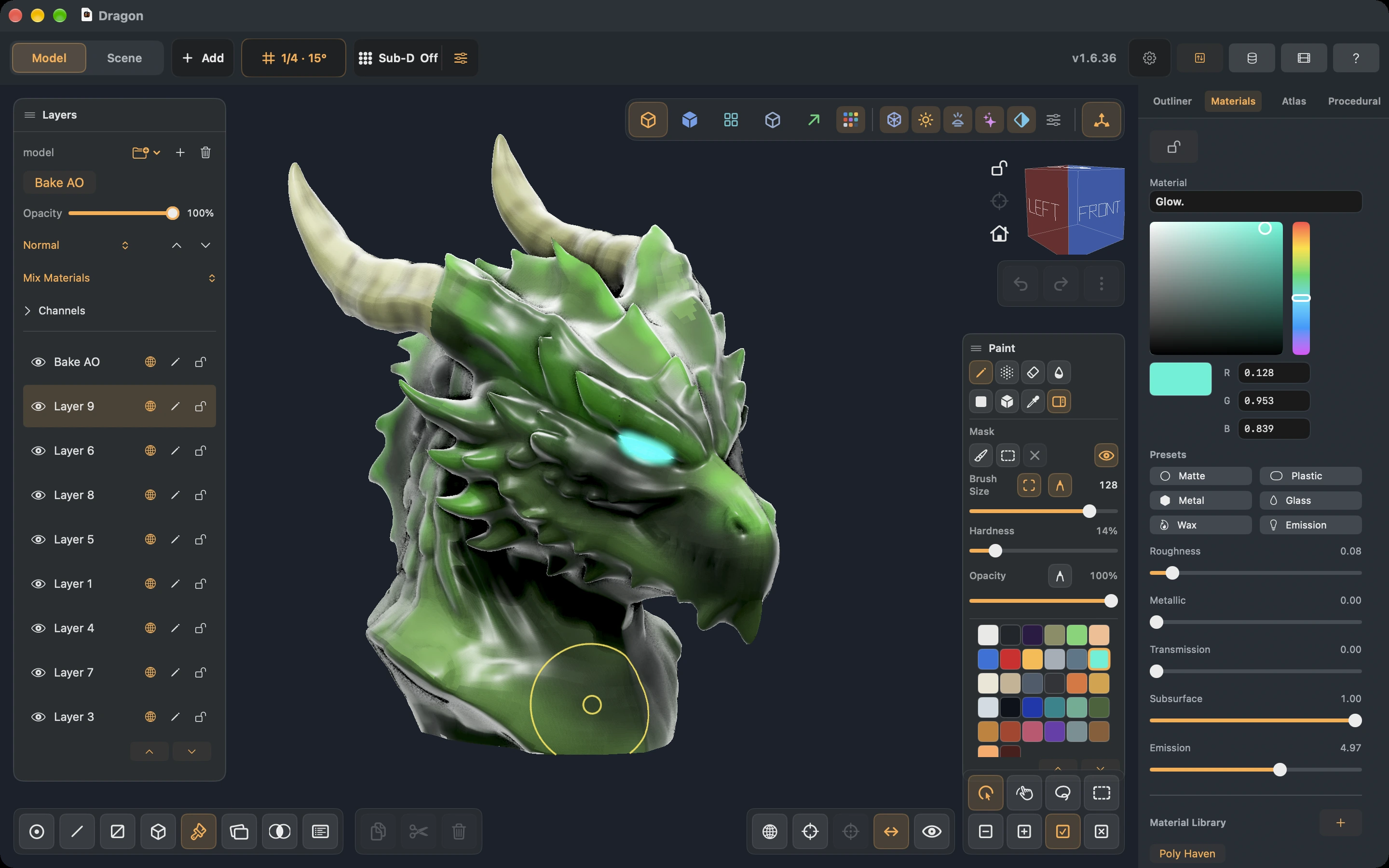
Build up a finish with independent paint layers, folders, opacity, blend modes, locks, and channel controls. Keep base colors, markings, and surface effects separate so you can revisit them later.
Paint on the model or in the UV Atlas with Pencil, Airbrush, Erase, and Smooth. Pixel masks protect texture regions across layers, with brush, rectangle, and lasso controls. Separate pressure settings for brush size and opacity give you more control over each stroke.
Paint layers support Normal, Multiply, Screen, and Overlay blending. Drag layers to reorder them, group them in collapsible folders, and control visibility and locking independently. Erasing reveals the layers underneath rather than destroying the whole finish.
Brushes and direct Atlas painting
Airbrush builds up paint while held, with Flow controlling the rate. Pencil and Erase have adjustable hardness for crisp or soft edges. Smooth Paint blends neighboring paint on the active layer; desktop users can hold Shift while brushing.
The Screen Size option keeps brush size consistent on screen as you zoom. Size and opacity have independent pen-pressure controls. Lasso and Box painting fill precisely clipped texture regions, while the brush footprint previews the surface area you will affect.
Paint directly in the 2D Atlas with Pencil, Airbrush, Erase, Fill, and material picking while the model updates. Choose 512, 1024, 2048, or 4096 texture resolution without moving the UV layout; layers and masks resize together. Higher resolutions depend on device memory.
A richer material system
Layers can Blend Properties, Mix Materials with separate material responses, or act as a Coating over a preserved substrate. Coatings expose index of refraction and optical tint thickness, allowing finishes such as clear or tinted coatings over painted or metallic surfaces.
Control each layer's contribution to Color, Roughness, Metallic, Transmission, Subsurface, and Emission with independent switches and strengths. Material presets include Matte, Plastic, Metal, Glass, Wax, and Emission. Image materials support normal, roughness, metallic, and opacity maps, including alpha cutout.
The shared Materials & Textures library works across Model and Scene. Import an image once, adjust UV repetition, and apply or drag a material onto geometry. Scene material overrides change an instance while preserving its source, and shared images are embedded in the project.
Poly Haven materials
Browse materials by name or category, inspect previews, and import their PBR maps at 1K, 2K, or 4K. Choose Use for painting to activate a material or Fill layer to apply it while retaining the rest of the stack. Downloaded textures remain in the saved project.
Procedural brushes and height detail
Build reusable brush slots from circles, rounded rectangles, capsules, rings, polygons, stars, and torn shapes. Add grid or brick repetition, seeded noise, imported image stamps, and union, subtraction, intersection, or smooth blending.
Tiles can feed the brush mask or output Color, Roughness, Metallic, and Height. Height adds surface-normal detail in Studio and the path tracer without changing the mesh. Saved slots let you switch between custom brushes without rebuilding them.
Bake ambient occlusion
Bake AO computes self-occlusion in the background and adds it as a new color-only Multiply layer. Existing paint stays intact, and the result can be hidden, reordered, or reduced in opacity. This is separate from live viewport AO, which now has radius and strength controls.
Scene composition, cameras, and animated lights
Arrange reusable model instances in Scene while keeping their shared source editable in Model. A project can hold multiple models and scenes, with independent instance placement.
Add perspective or orthographic cameras and Directional, Point, Spot, or Area Lights. Frame a shot through a scene camera, set aim targets, parent items, and enable authored lighting and shadows in Studio.
Animate camera and light movement with transform keys. Separate property keys animate lens settings, light color and intensity, range, spot angles, area dimensions, and light/shadow switches. Preview the animated items together to judge the complete composition.
Desktop path tracing and image rendering
Forge now includes a progressive path tracer on Mac, Windows, and Linux. It previews indirect lighting with HDR environments and authored scene lights, including soft shadows from area lights.
The tracer supports rough metallic reflections, emissive materials, glass transmission and refraction, and subsurface scattering inside closed wax-like meshes. Painted UV textures and their material channels participate in the rendered result, along with layered materials, coatings, and height detail. Exposure and tone mapping follow the Studio settings.
Use the viewport preview to inspect a finish, or choose output dimensions and samples with Render Image, then save the resulting PNG. Path tracing remains experimental: glass uses a fixed IOR of 1.5, and nested media and refractive shadow caustics are not supported.
Path tracing is desktop-only in the current release. iPad and Android use Studio/PBR rendering.
Read about rendering and export.
UVs, imports, and export options
Auto Generate UVs creates separated, packed charts for an object while preserving existing paint through reprojection. Geometry imports warn about overlapping UVs and let you retain the original layout or generate a new one. OBJ/STL imports offer source-unit choices so incoming geometry can be interpreted at the right scale.
Import OBJ, STL, and 3MF as editable geometry in Model, or as a new model asset placed in Scene. 3MF component assemblies are supported. Textured OBJ imports can seed editable paint while retaining their UVs.
Export choices now include:
- 3MF with painted colors for compatible printing workflows, retaining hard color boundaries. This carries color rather than the full PBR material response.
- OBJ Preserve Topology for authored polygon faces, plus triangulated vertex-color choices with sharp color boundaries or welded geometry.
- Textured OBJ, GLB, and USDZ with baked appearance; GLB also carries supported normal, metallic/roughness, and emissive maps and alpha-mask settings.
Geometry and OBJ/STL/GLB/USDZ exports use meters consistently. Project units change measurement display and numeric input without resizing a model. Scale factor provides an explicit, undoable way to resize geometry and assembly spacing. Prefer unit-aware 3MF when sending a model to a slicer.
Workspace, documents, and everyday improvements
Customize Model and Scene toolbars independently. Assign a shortcut directly by right-clicking a Model tool or action; on touch devices, long-press and use a hardware keyboard. Conflict detection and Reset to Default help keep bindings manageable. The shortcut reference lists the revised defaults.
Choose Automatic, Light, or Dark appearance. Video Feedback adds click/tap ripples, hover and drag rings, and key badges for recording tutorials; Pencil hover is available on supported iPads.
Projects use compact, compressed storage while retaining editable sources, layers, UVs, and scene data. Loading, saving, painting, and viewport navigation have received substantial performance work. Studio refines lighting while idle, with a responsive interaction preview during editing.
Windows and Linux packages include document-thumbnail integration. Rust desktop and Android gain Save Backup, and iPad gains an automatic-save preference with Save/Discard handling when automatic saving is off. The release also includes fixes for paint seams, symmetry, UV boundaries, material export, document recovery, and closing documents.
Learn the new workflows
The manual includes dedicated lessons for editable Booleans, Grab Brush and snapping, layered painting, procedural brushes, and animated cameras and lights.
Visit Videos / Tutorials for video walkthroughs, or get Forge to start creating.